In a short time, Max will move to Shanghai.
Since blogger is blocked by Chinese government, Max has to switch to a lcoal blog service provider in China and continue the writing.
New blog link: http://thekingisgone.72pines.com/
2011-01-07

2011-01-04
A script for build Qt application for board arm-
A script build-armsys-6410.sh to build the Qt application for board armsys6410.
make
- Cross-compiler is located at /usr/local/arm/4.2.2-eabi/usr/bin
- Built Qt by the cross-compiler is installed at /usr/local/qt-4.7.1-armsys-6410/bin/qmake
- Built Tslib by the cross-compiler is installed at /usr/local/tslib/lib
export PATH=/usr/local/arm/4.2.2-eabi/usr/bin:$PATH
make clean
/usr/local/qt-4.7.1-armsys-6410/bin/qmake LIBS+=-L/usr/local/tslib/lib\ -ltsmake
Fullscreen of Qt Application
See the nice tutorial at Meego
http://wiki.meego.com/QML/Full-screen_applications
http://wiki.meego.com/QML/Full-screen_applications
2011-01-03
Find all files newer than a givne file
find . -type f -newer ./include/linux/sonet.h -not -empty -print | xargs ls -l | less
2011-01-02
U-Boot Arguments of armsys-6420
NFS boot:
boot from nandflash
setenv bootargs "root=/dev/nfs nfsroot=192.168.2.118:/home/max/work/arena/rootf/armsys6410/root/ ip=192.168.2.10:192.168.2.118:192.168.2.1:255.255.255.0:armsys.hzlitai.com:eth0:off console=ttySAC0,115200"Here /home/localhost/armsys6410/root is the file system located at my host machine. 192.168.2.10 is the static ip of board, while 192.168.2.118 should be ip of host machine, 192.168.2.1 is the gateway of the LAN, if the board is directly connect to host, the gateway ip is same as host ip, i.e, 192.168.2.118 here.
boot from nandflash
After changing the bootargs, run the following commands to save it and reboot again.setenv bootargs "root=/dev/mtdblock2 rootfstype=yaffs2 console=ttySAC0,115200"setenv bootcmd nand read 0xc0008000 0x100000 0x300000\;bootm 0xc0008000
>saveenv>reset
2011-01-01
tslib Error & Solution
Task: Build Qt 4.7.1 for board armsys-6410.
Toolchain: supplier provided toolchain (4.2.2-eabi-arm)
Error: When start a Qt example, the following error message show
The problem is solved by following:
Download & build the latest tslib again from http://tslib.berlios.de/
I use minicom here, the parameters are
Add following enviromental variables into /etc/profile
export TSLIB_ROOT=/usr/local/tslib
export TSLIB_TSDEVICE=/dev/input/event1
export TSLIB_CONFFILE=$TSLIB_ROOT/etc/ts.conf
export TSLIB_PLUGINDIR=$TSLIB_ROOT/lib/ts
export TSLIB_CALIBFILE=/etc/pointercal
export TSTS_INFO_FILE=/sys/devices/virtual/input/input0/uevent
export QWS_MOUSE_PROTO=tslib:/dev/input/event1
export QWS_KEYBOARD=TTY:/dev/tty1
export HOME=/root
export QTDIR=/usr/local/qt-4.7.1-armsys-6410
export QPEDIR=/usr/local/qt-4.7.1-armsys-6410
export PATH=$PATH:/usr/local/tslib/lib:$QTDIR/bin
export LD_LIBRARY_PATH=$QTDIR/lib:/usr/local/tslib/lib:/usr/local/lib:$LD_LIBRARY_PATH
Run calibration again.
The error messages didn't show again.
References
Nice man doc of tslib
http://www.blogger.com/post-edit.g?blogID=5974839100591333846&postID=6336916594199395808
About QWS_MOUSE_PROTO
http://doc.qt.nokia.com/4.7-snapshot/qt-embedded-pointer.html
homepage of tslib
http://tslib.berlios.de/
minicom nfs copy kernel to board
http://www.armsystem.com.cn/bbs/redirect.php?fid=29&tid=12260&goto=nextnewset
http://www.qtcentre.org/threads/23353-Qt-Embedded-4.5-TsLib-and-TSC-10-touch-screen-(Solved)
Toolchain: supplier provided toolchain (4.2.2-eabi-arm)
Error: When start a Qt example, the following error message show
QWSTslibMouseHandlerPrivate: ts_config() failed with error: 'No such file or directory'
Please check your tslib installation!
The problem is solved by following:
Download & build the latest tslib again from http://tslib.berlios.de/
> tar xzvf tslib-1.4.gz
> cd tslib
>./autogen.sh
>./configure -host=arm-linux -prefix=/usr/local/tslib
>makeQt was successfully build with the toolchain:
>make install
./configure -prefix /usr/local/qt-4.7.1-armsys-6410 -embedded arm -xplatform qws/linux-arm-g++ -depths 16 -qt-mouse-tslib -I/usr/local/tslib/include -L/usr/local/tslib/lib -R /usr/local/tslib/lib -xmlpatterns -exceptions
makeCopy the installed Qt into root file system, which will be nfs mounted by board
make install
sudo cp -rf /usr/local/qt-4.7.1-armsys-6410 /home/max/work/arena/rootf/armsys6410/root/usr/local/Start the board by nfs mounting /home/max/work/arena/rootf/armsys6410/root/
I use minicom here, the parameters are
setenv bootargs "root=/dev/nfs nfsroot=192.168.2.118:/home/max/work/arena/rootf/armsys6410/root/ ip=192.168.2.10:192.168.2.118:192.168.2.1:255.255.255.0:armsys.hzlitai.com:eth0:off console=ttySAC0,115200"Check the device file of touchscreen. Assume the device of board is /dev/input/event1
cat /dev/input/event1| hexdumpNow when you move the mouse in the touchscreen, the similar texts will be displayed on the console. It means that /dev/input/event1 is the correct device file of touchscreen on board.
...
0000300 7cc6 3a50 bb73 000b 0003 0001 1f94 0000
0000310 7cc6 3a50 bb7d 000b 0000 0000 0000 0000
0000320 7cc6 3a50 cee6 000b 0003 0000 0fbb 0000
0000330 7cc6 3a50 cefa 000b 0003 0001 1fff 0000
0000340 7cc6 3a50 cf03 000b 0000 0000 0000 0000
0000350 7cc6 3a50 e269 000b 0001 014a 0000 0000
0000360 7cc6 3a50 e27c 000b 0003 0018 0000 0000
0000370 7cc6 3a50 e281 000b 0000 0000 0000 0000
....
0000320 7cc6 3a50 cee6 000b 0003 0000 0fbb 0000
0000330 7cc6 3a50 cefa 000b 0003 0001 1fff 0000
0000340 7cc6 3a50 cf03 000b 0000 0000 0000 0000
0000350 7cc6 3a50 e269 000b 0001 014a 0000 0000
0000360 7cc6 3a50 e27c 000b 0003 0018 0000 0000
0000370 7cc6 3a50 e281 000b 0000 0000 0000 0000
....
Add following enviromental variables into /etc/profile
export TSLIB_TSDEVICE=/dev/input/event1
export TSLIB_CONFFILE=$TSLIB_ROOT/etc/ts.conf
export TSLIB_PLUGINDIR=$TSLIB_ROOT/lib/ts
export TSLIB_CALIBFILE=/etc/pointercal
export TSTS_INFO_FILE=/sys/devices/virtual/input/input0/uevent
export QWS_MOUSE_PROTO=tslib:/dev/input/event1
export QWS_KEYBOARD=TTY:/dev/tty1
export HOME=/root
export QTDIR=/usr/local/qt-4.7.1-armsys-6410
export QPEDIR=/usr/local/qt-4.7.1-armsys-6410
export PATH=$PATH:/usr/local/tslib/lib:$QTDIR/bin
export LD_LIBRARY_PATH=$QTDIR/lib:/usr/local/tslib/lib:/usr/local/lib:$LD_LIBRARY_PATH
Run calibration again.
/usr/local/tslib/bin/ts_calibrateTry a Qt example,
/usr/local/qt-4.7.1-armsys-6410/examples/widgets/calculator/calculator -qws
The error messages didn't show again.
References
Nice man doc of tslib
http://www.blogger.com/post-edit.g?blogID=5974839100591333846&postID=6336916594199395808
http://doc.qt.nokia.com/4.7-snapshot/qt-embedded-pointer.html
homepage of tslib
http://tslib.berlios.de/
minicom nfs copy kernel to board
http://www.armsystem.com.cn/bbs/redirect.php?fid=29&tid=12260&goto=nextnewset
http://www.qtcentre.org/threads/23353-Qt-Embedded-4.5-TsLib-and-TSC-10-touch-screen-(Solved)
2010-12-27
Build Qt 4.7 for armsys-6410
=======================
Install the crossing toolchain
=======================
refer to chapter 4 安装交叉编译器
交叉编译工具链的安装文件为“ARMSYS6410-B基础配置光盘资料\Linux相关\linux2.6标准版\交叉编译器”目录下的 cross-4.2.2-eabi.tar.bz2.
=======================
Build tslib (touch screen)
=======================
Install necessary tools
Download souce of tslib from http://tslib.berlios.de/
Build tslib
=======================
Build Qt 4.7.1
=======================
Download qt-4.7.1
Configure the Qt Embedded.
Build Qt
Install the crossing toolchain
=======================
refer to chapter 4 安装交叉编译器
交叉编译工具链的安装文件为“ARMSYS6410-B基础配置光盘资料\Linux相关\linux2.6标准版\交叉编译器”目录下的 cross-4.2.2-eabi.tar.bz2.
>tar xjvf cross-4.2.2-eabi.tar.bz2 –C /usr/local/arm
>export PATH=$PATH:/opt/toolchains/arm920t-eabi/bin
=======================
Build tslib (touch screen)
=======================
Install necessary tools
> apt-get install autoconf automake libtool
Download souce of tslib from http://tslib.berlios.de/
Build tslib
> tar xzvf tslib-1.4.gz
> cd tslib
>./autogen.sh
>./configure -host=arm-linux -prefix=/usr/local/tslib -enable-input=no (wrong???)
tslib will be install at /usr/local/tslib. If get error, you may comment out the line " '#define malloc rpl_malloc" in config.h
>makeReference: http://blog.chinaunix.net/u2/75270/showart_1793535.html
>make install
=======================
Build Qt 4.7.1
=======================
Download qt-4.7.1
>wget http://get.qt.nokia.com/qt/source/qt-everywhere-opensource-src-4.7.1.tar.gz
>tar xfzv qt-everywhere-opensource-src-4.7.tar
Configure the Qt Embedded.
>./configure -prefix /usr/local/qt-4.7.1-armsys-6410 -embedded arm -xplatform qws/linux-arm-g++ -depths 16 -qt-mouse-tslib -I/usr/local/tslib/include -L/usr/local/tslib/lib -R /usr/local/tslib/lib -xmlpatterns -exceptions
- -qt-mouse-tslib: Qt will use tslib for touch screen
- -I/usr/local/tslib/include: lib path of tslib
- -L/usr/local/tslib/lib: includepath of tslib
- -qconfig nocursor: no cursor is shown in touch screen
- -xplatform qws/linux-arm-g++: see http://doc.qt.nokia.com/main-snapshot/qt-embedded-crosscompiling.html
Build Qt
>makeReference: http://doc.qt.nokia.com/main-snapshot/qt-embedded-crosscompiling.html
>make install
2010-12-20
A walkaround: assign a static IP to eth0 for nfs remotely start system
I tried to boot the target board "armsys6410" by remotely loading a root file system through nfs. According to the given user manual, the argument of u-boot is
The problem of mine is I cannot fix a static IP to eth0, when I use at the same time wlan0. I didn't find a ultimate solution for the problem. Here is just walkaround:
Precondition: minicom has been correctly configured, serial port and cross-over cable have been correctly connected between host and target.
1) reset the board
2) press any key to suspend the booting (I use u-boot here)
3) >sudo ifconfig eth0 192.168.253.2 netmask 255.255.255.0 up
4) in minicom, input "reset"
Then the board can start with given root file system
setenv bootargs "root=/dev/nfs nfsroot=192.168.253.2:/hom/localhost/armsys6410/root/ ip=192.168.253.12:192.168.253.2:192.168.253.2:255.255.255.0:armsys.hzlitai.com:eth0:off console=ttySAC0,115200"Here /home/localhost/armsys6410/root is the file system located at my host machine. 192.168.253.12 is the static ip of board, while 192.168.253.2 should be static ip of host machine.
The problem of mine is I cannot fix a static IP to eth0, when I use at the same time wlan0. I didn't find a ultimate solution for the problem. Here is just walkaround:
Precondition: minicom has been correctly configured, serial port and cross-over cable have been correctly connected between host and target.
1) reset the board
2) press any key to suspend the booting (I use u-boot here)
3) >sudo ifconfig eth0 192.168.253.2 netmask 255.255.255.0 up
4) in minicom, input "reset"
Then the board can start with given root file system
Setup minicom for mini2440
For windows, it is recommended to use Hyperterminal for serial port communication. In order to develop under linux via nfs, a terminal software 'Minicom' is installed and applied instead of Hyperterminal. The USB to serial adapter is used for my laptop. The following items are related for Minicom.
- Install minicom package
- Check if there is active serial ports:
>dmesg | grey tty
[ 0.004000] console [tty0] enabled
[ 1.174860] serial8250: ttyS0 at I/O 0x3f8 (irq = 4) is a 16550A
[ 2237.927394] usb 3-1: pl2303 converter now attached to ttyUSB0
- Check read/write permissions on /dev/ttyUSB0 file:
>ls -la /dev | grep ttyUSB0
crw-rw---- 1 root dialout 188, 0 2009-10-10 13:59 ttyUSB0
- If the permissions are not set as above, it can be configured as below:
>chown root /dev/ttyUSB0
>chgrp dialout /dev/ttyUSB0
>chmod 660 /dev/ttyUSB0
- Add debian user in the dialout group (for me the user is 'lp')
>adduser lp dialout
- To see which users are members of the dialout group, open the /etc/group file and look for th eline beginning with dialout
>cat /etc/group | grep dialout
- Start and configure minicom under superuser mode
>minicom -s
>Select 'Select port setup'
>Change Serial Device from '/dev/ttyS1' to '/dev/ttyUSB0'
>Set Hardware Flow Control from 'Yes' to 'No'
>'Save setup as ...' mini2440_config'- Start minicom using 'mini2440_config'
>minicom mini2440_config
- Leave minicom
>Ctrl A->X
IMPORTANT NOTES:
If you use a linux system in vmware, this configuration may not work. You need to
- check if your vmware is a bridged network
- disable your firewall in your host machine.
- read this tutorial.
2010-11-20
Several Patent Search Engines
- Free Patents Online: http://www.freepatentsonline.com/
- Patent Storm: http://www.patentstorm.us/
- Google Patents: http://www.google.com/patents
- United States Patent: http://www.uspto.gov/
- World Intellectual Property Organization: http://www.wipo.int/
2010-11-17
Build an Angstrom Image & Toolcain for mini2440
According to the tutorial in [1], an Angstrom image has been successfully bitbaked for mini2440. But an Angstrom toolchain is still missing. Analog to [2], the following commands can bitbake a compatible toolchain for this image.
>source source-me.txt
>bitbake meta-toolchain
The toolchain can be found at "angstrom-dev/deploy/glibc/sdk"
To install the toolchains:
The toolchain is installed at /usr/local/angstrom/arm/
To use the toolchain, source the script[3]:
>. /usr/local/angstrom/arm/environment-setup
Reference:
[1] http://www.electronics.diycinema.co.uk/embedded/mini2440/configuring-open-embedded-to-bake-angstrom-images-for-the-mini2440/
[2] http://groups.google.com/group/beagleboard/browse_thread/thread/b11d9c53d6f09536/33c537f7d08f1952
[3] http://docs.openembedded.org/usermanual/html/ch05s08.html
>source source-me.txt
>bitbake meta-toolchain
The toolchain can be found at "angstrom-dev/deploy/glibc/sdk"
angstrom-2010.7-test-20101117-i686-linux-armv4t-linux-gnueabi-toolchain-extras.tar.bz2
angstrom-2010.7-test-20101117-i686-linux-armv4t-linux-gnueabi-toolchain.tar.bz2
angstrom-2010.7-test-20101117-i686-linux-armv4t-linux-gnueabi-toolchain.tar.bz2
To install the toolchains:
> tar -C / -jxvf *.tar.bz2
The toolchain is installed at /usr/local/angstrom/arm/
To use the toolchain, source the script[3]:
>. /usr/local/angstrom/arm/environment-setup
Reference:
[1] http://www.electronics.diycinema.co.uk/embedded/mini2440/configuring-open-embedded-to-bake-angstrom-images-for-the-mini2440/
[2] http://groups.google.com/group/beagleboard/browse_thread/thread/b11d9c53d6f09536/33c537f7d08f1952
[3] http://docs.openembedded.org/usermanual/html/ch05s08.html
2010-10-31
Update date&time in Debian
>sudo apt-get update
>sudo apt-get install ntpdate
>sudo ntpdate ntp.ubuntu.com
>sudo apt-get install ntpdate
>sudo ntpdate ntp.ubuntu.com
2010-09-29
The first charactor of 'ls -l'
- - normal file
- d directory
- s socket file
- l link file
- c character special
- p fifo (named pipe)
- b block speical
http://www.thegeekstuff.com/2009/07/linux-ls-command-examples/
Solve Warning of minicom: unable to open an initial console.
The situation is:
I want to use nfs system on my linux host (debian, squezze) to start the embedded device (mini2440). The system can successfully start but the minicom didn't work any more. A warning message was reported:
Warning: unable to open an initial console.
The reason:
The nfs system on my linux host has no /dev/console.
The solution:
>cp -rf /dev/console $rootf/dev/
Reference:
http://kerneltrap.org/node/6854
I want to use nfs system on my linux host (debian, squezze) to start the embedded device (mini2440). The system can successfully start but the minicom didn't work any more. A warning message was reported:
The reason:
The nfs system on my linux host has no /dev/console.
The solution:
>cp -rf /dev/console $rootf/dev/
Reference:
http://kerneltrap.org/node/6854
2010-09-21
Configure with --host, --target and --build options
When people configure a project like './configure', man often meets these three confusing options, which are more related with cross-compilation
'./configure --host=arm-linux --build=i686-pc-linux-gnu': the dynamically library is built on a x86 linux computer but will be used for a embedded arm linux system.
Reference:
http://matrix.wearlab.de/en/wiki/index.php?title=ArmCrossCompiler&redirect=no
- --host: In which system the generated program will run.
- --build: In which system the program will be built.
- --target: this option is only used to build a cross-compiling toolchain. When the tool chain generates executable program, in which target system the program will run.
'./configure --host=arm-linux --build=i686-pc-linux-gnu': the dynamically library is built on a x86 linux computer but will be used for a embedded arm linux system.
An example of gcc:
'./configure --target=i686-pc-linux-gnu --host=arm-linux --build=i686-pc-linux-gnu':- A gcc compiler is build on x86 linux computer. [--build]
- The gcc will be executed on an embedded arm linux system.[--host]
- But the gcc will generate the binary program, which run in a x86 linux system. [--target]
Reference:
http://matrix.wearlab.de/en/wiki/index.php?title=ArmCrossCompiler&redirect=no
Increase fsck fequency at startup
Totally disable forced fsck at startup is a bad idea. But it takes more than 5 minutes to scanning a huge disk for every 24 times boot. Why not just change the fequency of forced fsck? The solution is using tune2fs.
1) Check your disk.
>df
/dev/sda1 7850996 5316724 2135460 72% /
tmpfs 257324 0 257324 0% /lib/init/rw
udev 252876 144 252732 1% /dev
tmpfs 257324 0 257324 0% /dev/shm
So, my disk is /dev/sda1
2) Configure the fequency of forced fsck.
Reference:
http://ubuntuforums.org/archive/index.php/t-1066069.html
1) Check your disk.
>df
/dev/sda1 7850996 5316724 2135460 72% /
tmpfs 257324 0 257324 0% /lib/init/rw
udev 252876 144 252732 1% /dev
tmpfs 257324 0 257324 0% /dev/shm
So, my disk is /dev/sda1
2) Configure the fequency of forced fsck.
- sudo tune2fs -c 100 /dev/sda1 (100 boot)
- sudo tune2fs -i 365d /dev/sda1 (365 day)
Reference:
http://ubuntuforums.org/archive/index.php/t-1066069.html
2010-09-20
The Basic of PCM
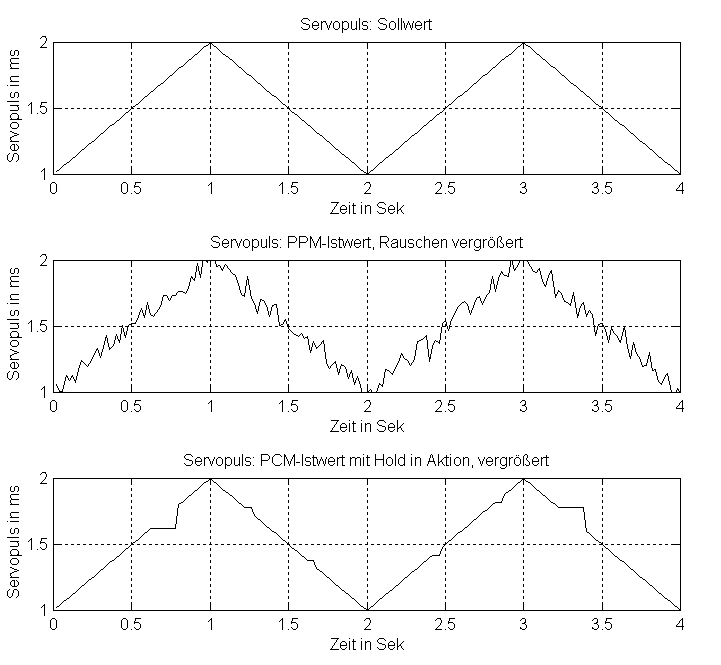
PCM stands for "Pulse Code Modulation". In plain text, an analog signal is sampled and the samples is encoded into a stream of PCM word.

PCM data is relatively immune against noise during transmission because the reciever need only to tell "1" or "0" states of the inputing stream.

Reference:

PCM data is relatively immune against noise during transmission because the reciever need only to tell "1" or "0" states of the inputing stream.
Reference:
High impedance of output
In digital circuit, the output line has usually three states, namely, 0, 1 and high impedance.
In the state of 0 or 1, the output line has a low impedance. When the output in the high impedance state, the output line will be effectively removed from the rest of circuit. In such way, it allows multiple circuits to share the same output line.
In the state of 0 or 1, the output line has a low impedance. When the output in the high impedance state, the output line will be effectively removed from the rest of circuit. In such way, it allows multiple circuits to share the same output line.
Arbiter
Abiter is an eletronic device to determine the order of access to a shared resource, when the resource is almost at the same time requested by several processores.
How SPI works
Based on SPI wiki, a short summary of SPI mechimism.

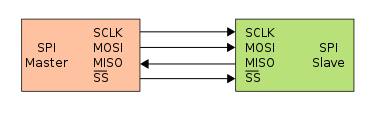
During each SPI clock cycle, a full duplex data transmission occurs:

Four logic signals.
- SCLK — Serial Clock (output from master)
- MOSI/SIMO — Master Output, Slave Input (output from master)
- MISO/SOMI — Master Input, Slave Output (output from slave)
- SS — Slave Select (active low; output from master)
Data transimission:
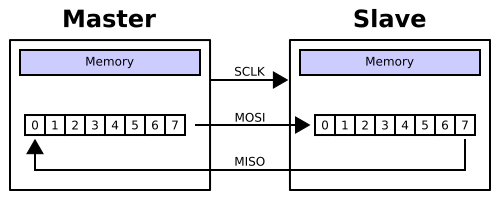
During each SPI clock cycle, a full duplex data transmission occurs:
- the master sends a bit on the MOSI line; the slave reads it from that same line
- the slave sends a bit on the MISO line; the master reads it from that same line
Subscribe to:
Posts (Atom)